React Application
Application Structure
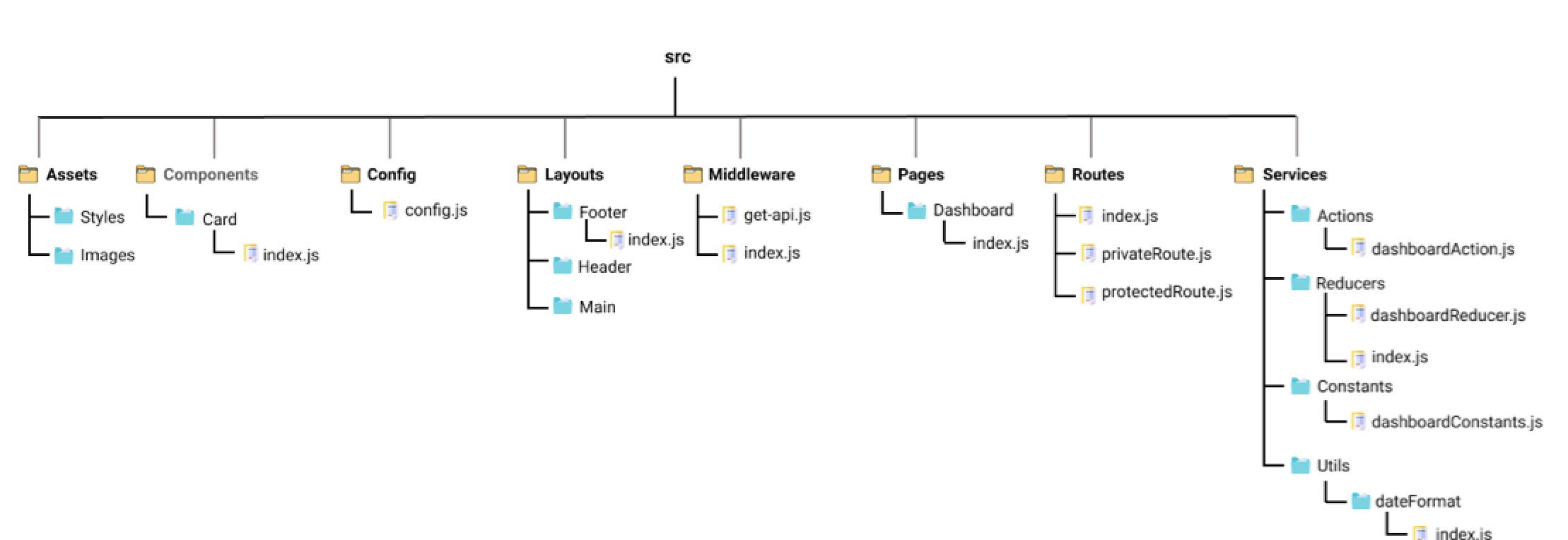
No single way of structuring the application, but here is one possible way.Note that index.js is usually the entry point (pretty much the same idea as index.html, the browser first fetches this), app.js is usually located at top level.
- /src/assets: images and global styles
- /src/layouts: global layouts, such as headers and footers
- /src/components: building components like buttons, etc.
- /src/pages: application by page, which consists of multiple components
- /src/config: for cross-environment development
- /src/utils: repeatedly used functions
Components
A React component is a reusable unit, which often involves rendering html whenever some data changes.To define a component:
/*App.js*/
// first import lib; 'react' is installed as a dependency
import React from 'react';

// then use a func to define a component, called func component
// the name MUST be capitalized, otherwise it's a built-in component
function SomeComponent(){
    return <h1>This is a JSX element, reused as a react component.</h1>;
}

// export this component
export default SomeComponent;Function components must return some React elements in JSX syntax.
/*index.js*/
// only import ReactDOM when you have render-related tasks
import React from 'react';
import ReactDOM from 'react-dom/client';

// import the function component from App.js
import SomeComponent from './App'

// render the component using an html-like syntax
ReactDOM.createRoot(document.getElementById('app')).render(<SomeComponent/>);

/* very similar to the JSX example above, can break it down into
 * var root = ReactDOM.createRoot(document.getElementById('app'));
 * root.render(<SomeComponent/>);
* but if you write it like this, ReactDOM won't update when there is a change in SomeComponent */.createRoot() and .render() are usually only called once.
ReactDOM re-renders automatically when there is an update in the components. The argument passed to
.createRoot() is usually the main component in index.html.
Component Interactions
function RabbitImage(){
    return <img src="../rabbit" alt="rabbit"/>;
} // a child of DisplayImage

function DisplayImage(){
    return <div> <RabbitImage/> </div>
}
Props
Each component has a prop, which is an object.What props are to components is similar to what attributes are to html elements.
Props are usually used to pass info from parent to child. They can be anything: strings, boolean, numbers, event handlers...
/* ShowProp.js */
// parent: pass props to component, wrap with {} if the value is not a string
function HandleClick(){
    alert("Don't rush! I'm handling the event!");
}

function ShowProp(){
    return <Greeting name="Bob" age={56} onClick={HandleClick}> Hello World </Greeting>;
} // names of the props don't really matter, you can change them to myHandler={HandleClick}
  // everything in between html tags, i.e. Hello World, can be access by child through props.children


/* Greeting.js */
// child
function Greeting(props){
    return (
        <h1 onClick={props.onClick}>
            {props.name}, aged {props.age}, says = {props.children}
        <h1/>
    );
}

export default Greeting; // write in parameter
function Greeting({message='Hello World'}){...}
// write in function body
function Greeting(props){
const {message = 'Hello World'} = props;
// ...
}
// write outside function
Greeting.defaultProps = {
message: 'Hello World',
};map function to create an array of components
import React from 'react';
import {comments} from './commentData'; // data source, an array

import Card from './Card';

function App(){
  return comments.map(comments =>
    <Card commentObject = {comments} />
  );
}

export default App;
Hooks
hooks record the state of the application.import React, {useState} from "react";
function Toggle() {
const [toggle, setToggle] = useState("Off"); // give it a default value
return (
<div>
<p>The toggle is {toggle}</p>
<button onClick={() => setToggle("On")}>On</button>
<button onClick={() => setToggle("Off")}>Off</button>
</div>
);
}export default function EmailTextInput() {
const [email, setEmail] = useState('');
// define the handler: 2 ways
// method 1
const handleChange = (event) => setEmail(event.target.value);
// method 2
const handleChange = ({target}) => setEmail(target.value);
// return the component with the handler
return <input value={email} onChange={handleChange} />
}// callback function: function passed as argument
// here prevIndex is a function that finds the previous index, it's passed as an argument to the state setter
// since the setter depends on the value of prevIndex, synchronization achieved
const goToNext = () => setIndex(prevIndex => prevIndex + 1);- state hook: takes an argument of the intial state;
[state_var, set_state_var] = useState(initial_val) - effect hook: when DOM changes, this function is called;
useEffect(() => { //... }); - context hook: subscribe to global context (theme...)
useContext(someContext); - reducer hook: an alternative to state hook;
different from useState, it takes another argument
reducer, which is basically a function called on an array of states; also, the state now becomes an array of states
[state_vars, set_state_var] = useState(reducer, initial_vals)
- only call hooks at the top level; do not call hooks inside loops, conditions or nested functions
- only call hooks from react function components; do not call hooks from JS functions