Parallelization
Timer
You can test how long something takes to run by using\t. For example,
\t do[1000000; til 100]You can also use a timer to set a function to run every so often.
            q) myVar: 0
            q) .z.ts:{myVar+:1}     // increase myVar by 1 when timer ticks
            q) system"t 1000"       // timer ticks every 1000 ms
            q) system"t 0"          // stop timer
Multithreading / Multiprocessing
Before we start, there are some limitations for the secondary threads in KDB:- You can't update global variables in secondary threads.
- You can't use sockets in secondary threads.
- For memory management,
.Q.w[]returns only memory of the main thread, but.Q.gc[]works for all threads. - Symbols are accessible to all threads, but the optimization algorithm for symbols only work in the mean thread, so in secondary threads it'll be slower to use symbols.
Here we only talk about the vanilla way to do multithreading.
Allocate threads / processes
The first step is to allocate multiple threads.You can either specify the number of threads when starting the q process:
q -s 4 Or you can change it dynamically in the q session:
q) \s 2 But pay attention, if you started the session with some number of threads, later in the session you won't be able to allocate more threads than you allocated upon starting the session.
Also, if you pass a negative value, it is multiprocessing. The rest of the use cases are the same. We will only talk about multithreading here.
Run in parallel
After allocating threads, you should be able to start multithreading.There are two ways to do it. Their differences are illustrated with a simple example.
Suppose we have a list
1 2 3 4 5 6, and we want to plus one to each value in the list.
Suppose we have three threads.
peach- this is parallel each.
q) {x+1} peach 1 2 3 4 5 6
peachwill allocate 1 4 to the first thread, 2 5 to the second thread, and 3 6 to the third thread.Q.fc- this is parallel cut.
q) .Q.fc[{x+1}; 1 2 3 4 5 6]
.Q.fcwill allocate 1 2 to the first thread, 3 4 to the second thread, and 5 6 to the third thread.
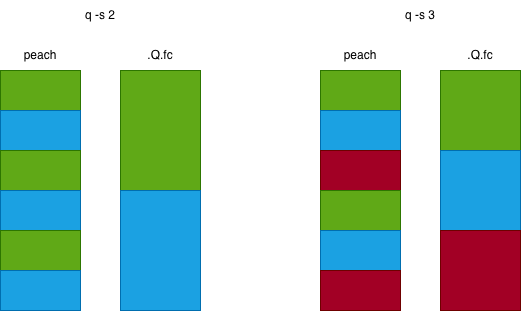
We're only looking at a very simple function in the above example, adding 1 to 1 and 10000 takes the same amount of time.
But imagine if the function runtime is input dependent, for example, a function that does a binary search on a sorted list.
If the list is short, the search will be fast, but if the list is long, the search will be slow.
In this case, we want to make sure the workload is balanced, so that no thread is idle while others are still working.
Say we still have three threads and six inputs.
If we use
peach, we want to make sure the 1st and 4th input together takes about the same
amount of
time as the 2nd and 5th input, and the 3rd and 6th input. If we use
.Q.fc, we want to make sure the 1st and 2nd input together takes about the same
amount of
time as the 3rd and 4th input, and the 5th and 6th input.
Examples of using multithreading
Run the same query across multiple partitions.
            q) raze (select from trade where date=x) peach .Q.pv
            // you need to use raze to flatten the result
addcol in parallel.
            addColPeach:{[dir;tbl;colName;defaultVal]
                add1col[;colName; enum[dir; defaultVal]] peach allPaths[dir; tbl];
            }
            // convert tbl to csv, then parallel save in 5 chunks into 5 files
            {(hsym `$"dir/file",string 1+x) 0: csv 0: tbl[x]} peach til 5
            // load the 5 csv (suppose data types are FSTFIC) and raze them together
            raze {1_ (\"FSTFIC\";csv) 0:  (hsym `$"dir/file",string 1+x)} peach til 5